HTML, CSS, JS Minifier and Beautifier – Free Online Tool
HTML / CSS / JS Minifier & Beautifier
HTML, CSS, JS Minifier and Beautifier is a free online tool that lets you instantly clean, format, or compress your web code. Whether you’re a developer or blogger, this tool helps you write neat HTML, minify CSS, or beautify JavaScript with one click. No login required, 100% mobile responsive.
Table of Contents
HTML / CSS / JS Minifier and Beautifier – Format, Optimize & Clean Your Code Online
Writing clean, optimized code is one of the most important parts of modern web development. Whether you’re creating a personal website, a business landing page, or a large web application, well-formatted and optimized code improves readability, performance, and maintainability.
Our HTML / CSS / JS Minifier and Beautifier is a free online tool that helps developers instantly beautify messy code or minify code for production. It supports HTML, CSS, and JavaScript, allowing you to format or compress your code in just a few clicks without installing any software.
Whether you’re a beginner learning web development or an experienced programmer working on professional projects, this tool makes code formatting quick, simple, and efficient.
What is an HTML, CSS, and JavaScript Minifier?
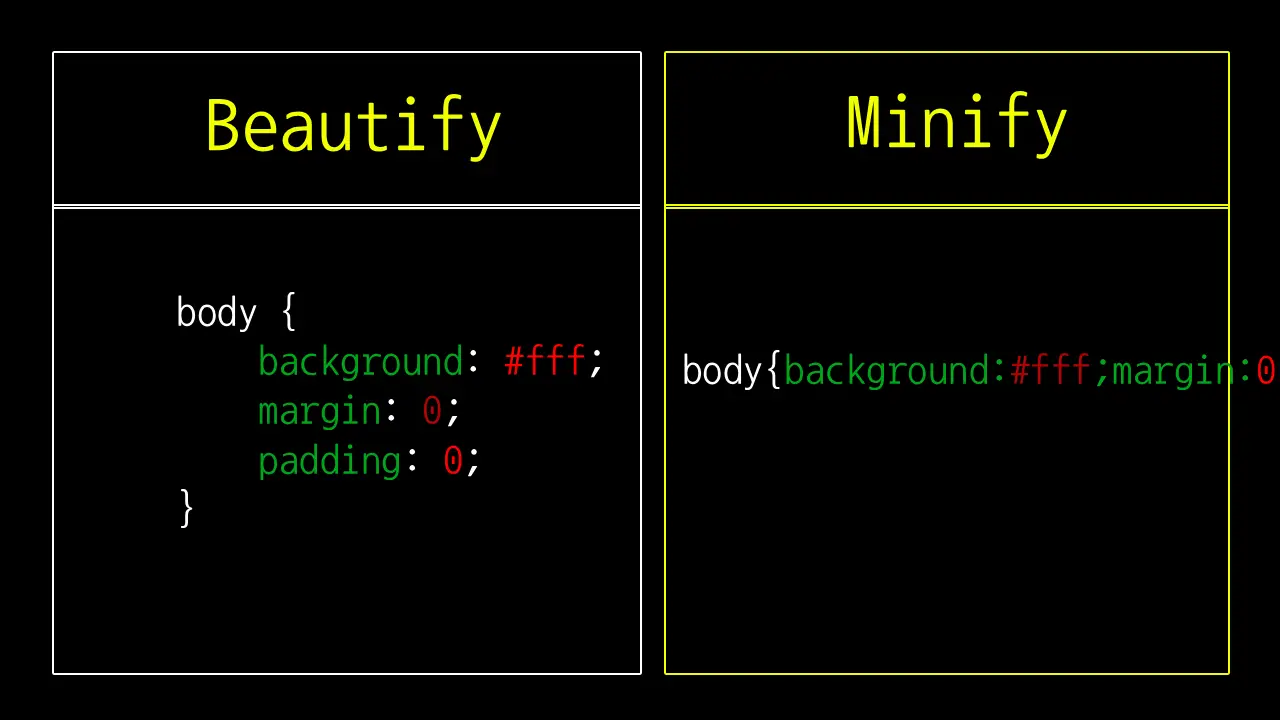
A code minifier is a tool that reduces the size of source code by removing unnecessary characters that are not required for execution. These include:
- Extra spaces
- Blank lines
- Tabs
- Line breaks
- Unnecessary indentation
- Comments (in supported cases)
Minification keeps the code functional while making the file significantly smaller. Smaller files load faster, consume less bandwidth, and help improve website performance.
What is a Code Beautifier?
A code beautifier performs the opposite task. Instead of compressing the code, it formats the code into a clean, readable structure.
Beautifying code automatically adds:
- Proper indentation
- Line breaks
- Consistent spacing
- Organized formatting
- Improved readability
This makes debugging, editing, and maintaining code much easier.
Why Should You Use This Tool?
Developers frequently switch between development mode and production mode.
During development, readable code is essential because it allows you to quickly understand the structure of your project and identify bugs.
Before deploying a website, minified code helps improve loading speed and reduces file size.
Instead of using multiple applications, this tool provides both features in one simple interface.
Key Features
Our HTML / CSS / JS Minifier and Beautifier includes several useful features designed for developers of all experience levels.
HTML Beautifier
Automatically formats HTML documents with proper indentation and spacing, making complex layouts much easier to understand.
CSS Beautifier
Organizes CSS styles into a clean structure so you can quickly locate selectors and properties.
JavaScript Beautifier
Formats JavaScript code with proper indentation and readable blocks, making debugging much simpler.
HTML Minifier
Removes unnecessary whitespace and line breaks to reduce HTML file size while preserving functionality.
CSS Minifier
Compresses CSS by removing extra spaces and unnecessary formatting without changing the styling.
JavaScript Minifier
Reduces unnecessary whitespace in JavaScript code to create a smaller file that’s better suited for production use.
Copy Result
Copy the processed code to your clipboard with a single click.
Clear All
Instantly remove both input and output content to start with fresh code.
Character Counter
View the total number of characters in your formatted or minified code.
Line Counter
See the total number of lines after formatting or compression.
Mobile Friendly
The tool works smoothly on desktops, tablets, and smartphones.
Responsive Design
The interface automatically adjusts to different screen sizes for a better user experience.
Benefits of Beautifying Code
Beautified code offers many advantages during development.
Easier Debugging
Proper indentation makes it easier to locate errors and identify logical problems.
Better Collaboration
Well-formatted code is easier for team members to read and understand.
Faster Maintenance
Organized code reduces the time required for future updates.
Improved Learning
Beginners can understand HTML, CSS, and JavaScript syntax much more easily when the code is properly formatted.
Benefits of Minifying Code
Minification is one of the simplest performance optimizations you can make.
Faster Website Loading
Smaller files require less time to download.
Reduced Bandwidth Usage
Compressed files consume fewer network resources.
Better User Experience
Fast-loading websites keep visitors engaged and reduce waiting time.
Improved Performance
Smaller assets allow browsers to process resources more efficiently.
Production Ready
Minified code is ideal for live websites where performance matters.
Who Can Use This Tool?
This online tool is suitable for almost anyone working with web technologies.
It is especially useful for:
- Front-end developers
- Full-stack developers
- Students learning web development
- Website owners
- Bloggers
- Freelancers
- UI developers
- Software engineers
- Coding instructors
- Programming beginners
How to Use the Tool
Using the tool is simple and requires only a few steps.
Step 1
Choose the code type:
- HTML
- CSS
- JavaScript
Step 2
Paste your source code into the input box.
Step 3
Click Beautify to format the code or Minify to compress it.
Step 4
The processed code will appear instantly in the output area.
Step 5
Copy the result or continue editing as needed.
When Should You Beautify Code?
Beautifying code is recommended when:
- Reading old projects
- Debugging issues
- Learning programming
- Sharing code with teammates
- Reviewing pull requests
- Editing generated code
When Should You Minify Code?
Minification is recommended when:
- Publishing websites
- Uploading production files
- Improving website performance
- Reducing page size
- Optimizing frontend assets
Why Choose Our Online Tool?
Unlike many complicated online utilities, this tool focuses on simplicity, speed, and ease of use.
Some advantages include:
- No registration required
- Completely free
- Instant processing
- Clean interface
- Mobile responsive
- Lightweight design
- Supports HTML, CSS, and JavaScript
- Safe local processing within your browser
- Beginner-friendly interface
- Works directly from your browser
Tips for Better Code Management
Following good coding practices improves productivity and makes projects easier to maintain.
Some useful tips include:
- Use meaningful variable names.
- Keep consistent indentation.
- Avoid unnecessary code duplication.
- Remove unused CSS and JavaScript.
- Minify production files before deployment.
- Beautify code before debugging.
- Comment important sections during development.
- Validate your HTML regularly.
- Organize CSS into logical sections.
- Keep JavaScript modular whenever possible.
A clean codebase is easier to maintain, while optimized code helps improve website performance. Our HTML / CSS / JS Minifier and Beautifier combines both capabilities in one convenient online tool, allowing you to format messy code for readability or compress production-ready files for faster delivery.
Whether you’re debugging a project, learning web development, or preparing assets for deployment, this tool provides a quick and reliable way to improve your workflow. Try it today to beautify your code, reduce file size, and make your development process more efficient.
Difference Between Minifier and Beautifier
| Feature | Code Minifier | Code Beautifier |
|---|---|---|
| Purpose | Compress code | Make code readable |
| Removes | Spaces, comments, breaks | Nothing important |
| Output | Compact, single-line code | Clean, multi-line formatted code |
| Best for | Production websites | Development & learning |
Both tools serve different needs, and developers often use both during a project.
Frequently Asked Questions
What does a minifier do?
A minifier compresses your HTML, CSS, or JavaScript code by removing extra spaces, line breaks, and comments—making the file smaller and load faster.
What is a code beautifier?
A beautifier makes your messy or minified code readable and well-formatted by adding indentation and structure.
Can I minify and beautify both?
Yes. You can paste your code, select your mode (HTML, CSS, or JS), and click “Beautify” or “Minify” based on your need.
Is this tool free?
Yes. The tool is completely free and does not require login or subscription.
Does it work on mobile?
Absolutely. The tool is fully mobile-friendly and works on all modern browsers.
Want more helpful tools? Check out all our online tools in one place.