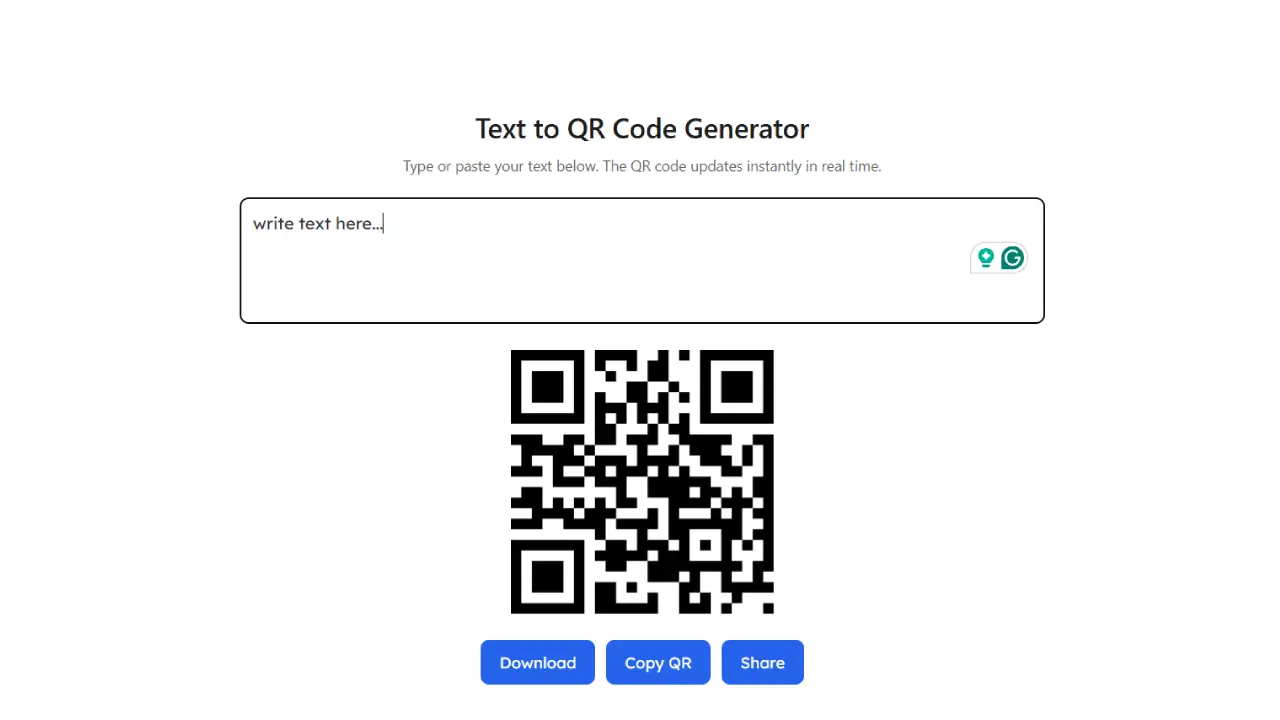
Text to QR Code Generator
Type or paste your text below. The QR code updates instantly in real time.
Text to QR Code Generator – Create QR Codes from Text Instantly
Free Text to QR Code Generator
Our Text to QR Code Generator is a simple and powerful online tool that lets you convert plain text into a QR code within seconds. Whether you want to share a message, contact details, instructions, notes, Wi-Fi information, or any other text, this tool helps you create a scannable QR code instantly.
QR codes have become a popular way to share information without typing. Instead of manually entering long text, users can simply scan the QR code using their smartphone camera and instantly view the stored content.
Our online Text to QR Code Generator is fast, free, and works directly in your web browser. No software installation or technical knowledge is required. Simply enter your text, generate the QR code, and download it for personal or professional use.
What is a Text to QR Code Generator?
A Text to QR Code Generator is an online utility that converts written text into a QR (Quick Response) code. A QR code is a two-dimensional barcode that stores information in a machine-readable format.
When someone scans the generated QR code using a smartphone or QR scanner, the encoded text appears instantly on their device.
This makes QR codes an easy and efficient way to share information without requiring users to type long messages manually.
Why Use a Text to QR Code Generator?
Typing lengthy text can be inconvenient, especially when sharing information with multiple people. QR codes simplify this process by allowing instant access to the stored text.
Some key benefits include:
- Share text instantly
- No manual typing required
- Easy to scan with smartphones
- Quick information sharing
- Saves time
- Reduces typing errors
- Works on Android and iPhone
- Easy to print on documents
- Perfect for business and education
- Free to use online
Whether you’re sharing event details, classroom notes, product instructions, or personal messages, QR codes make the process much faster and more convenient.
Features of Our Text to QR Code Generator
Our tool is designed to be simple, fast, and user-friendly.
Instant QR Code Generation
Convert your text into a QR code within seconds.
High-Quality QR Codes
Generate clear and sharp QR codes suitable for both digital sharing and printing.
Free Online Tool
Create unlimited QR codes without paying any subscription fees.
No Registration Required
You can use the tool without creating an account or logging in.
Browser-Based
Everything works directly in your web browser without downloading software.
Mobile Friendly
Generate QR codes from your smartphone, tablet, laptop, or desktop.
Quick Download
Download your generated QR code instantly and use it anywhere.
Unlimited Usage
Generate as many QR codes as you need without restrictions.
Who Can Use This Tool?
Our Text to QR Code Generator is useful for everyone.
Students
Share study notes, project information, and assignments through QR codes.
Teachers
Provide classroom instructions, homework details, and educational content.
Businesses
Share product descriptions, customer information, or promotional messages.
Event Organizers
Create QR codes containing event schedules, venue details, or instructions.
Marketing Professionals
Include QR codes on posters, brochures, and advertisements for easy access to information.
Office Employees
Share meeting notes, internal instructions, or office announcements.
Personal Users
Convert personal messages, reminders, shopping lists, or contact information into QR codes.
How to Use the Text to QR Code Generator
Using the tool is quick and easy.
Step 1
Open the Text to QR Code Generator.
Step 2
Type or paste your text into the input box.
Step 3
Click the Generate QR Code button.
Step 4
Wait a few seconds while the QR code is created.
Step 5
Download the generated QR code image.
Step 6
Share, print, or use the QR code wherever needed.
The entire process takes only a few seconds.
Common Uses of Text QR Codes
Text QR codes are widely used in many situations.
Popular examples include:
- Personal messages
- Study notes
- Event instructions
- Product information
- Business announcements
- Restaurant menus
- Office notices
- Wi-Fi setup instructions
- Educational materials
- Customer support details
- Shopping lists
- Emergency information
- Daily reminders
- Promotional campaigns
- Exhibition displays
Advantages of Using QR Codes
QR codes offer several advantages over plain text sharing.
Faster Information Access
Users can access information instantly by scanning the code.
No Typing Errors
Scanning eliminates mistakes caused by manual typing.
Easy Distribution
QR codes can be printed on paper or shared digitally through websites, emails, or social media.
Better User Experience
People can access information with just one scan.
Space Saving
Large amounts of text can be represented in a compact QR code.
Best Practices for Creating QR Codes
For the best scanning experience, consider these tips:
- Keep the text concise when possible.
- Use high-resolution QR codes.
- Print the QR code at an appropriate size.
- Ensure sufficient contrast between the QR code and its background.
- Test the QR code before sharing or printing.
- Avoid covering or cropping any part of the QR code.
These practices help ensure reliable scanning across different devices.
Is the Text to QR Code Generator Free?
Yes. Our Text to QR Code Generator is completely free to use. You can create unlimited QR codes without registration, subscriptions, or hidden charges.
Whether you need one QR code or hundreds, the tool is available whenever you need it.
Privacy and Security
Your privacy matters. The text you enter is used only to generate the QR code. Avoid including highly sensitive or confidential information in QR codes that may be publicly shared or printed.
Always review the content before distributing your QR code.
Frequently Asked Questions (FAQ)
What is a QR code?
A QR code is a two-dimensional barcode that stores information such as text, URLs, contact details, and more.
Can I generate QR codes for free?
Yes. This tool allows unlimited free QR code generation.
Can I download the QR code?
Yes. You can download the generated QR code image immediately after creation.
Will the QR code work on mobile phones?
Yes. Most Android and iPhone devices can scan QR codes using the built-in camera or a QR scanner app.
Do I need to install software?
No. Everything works directly in your web browser.
Can I create multiple QR codes?
Yes. There are no limits on how many QR codes you can generate.
Why Choose Our Text to QR Code Generator?
Our Text to QR Code Generator offers a fast, reliable, and user-friendly way to convert text into scannable QR codes. Whether you’re a student, teacher, business owner, marketer, or everyday user, this tool helps you share information quickly without requiring manual typing.
With instant QR code generation, high-quality downloads, mobile compatibility, browser-based access, and unlimited free usage, it provides an efficient solution for both personal and professional needs. If you’re looking for a simple way to create QR codes from text, this online tool is the perfect choice.